MongoDB - Getting Started
MacOS環境で、MongoDBの導入から基本操作(CRUD)までをまとめるメモ。
MongoDB 導入(概要)
1. brewでインストール
brew install mongodb-community2. バージョン確認
mongo --version3. ローカルからの起動について(mongosh)
brewでサービスを起動
brew services start mongodb-communityMongoDBホームページの方法でDBにアクセス
ログイン情報
username: tstdemo
password: *****ログインコマンド
mongosh "mongodb+srv://{tstyuan}.qtihi.mongodb.net/{DB名}" --username {tstdemo}サービスを停止する
brew services stop mongodb-communityローカル環境で操作開始
mongoCompass(MongoDB用GUI)について
アクセスしたイメージは下図のように見える
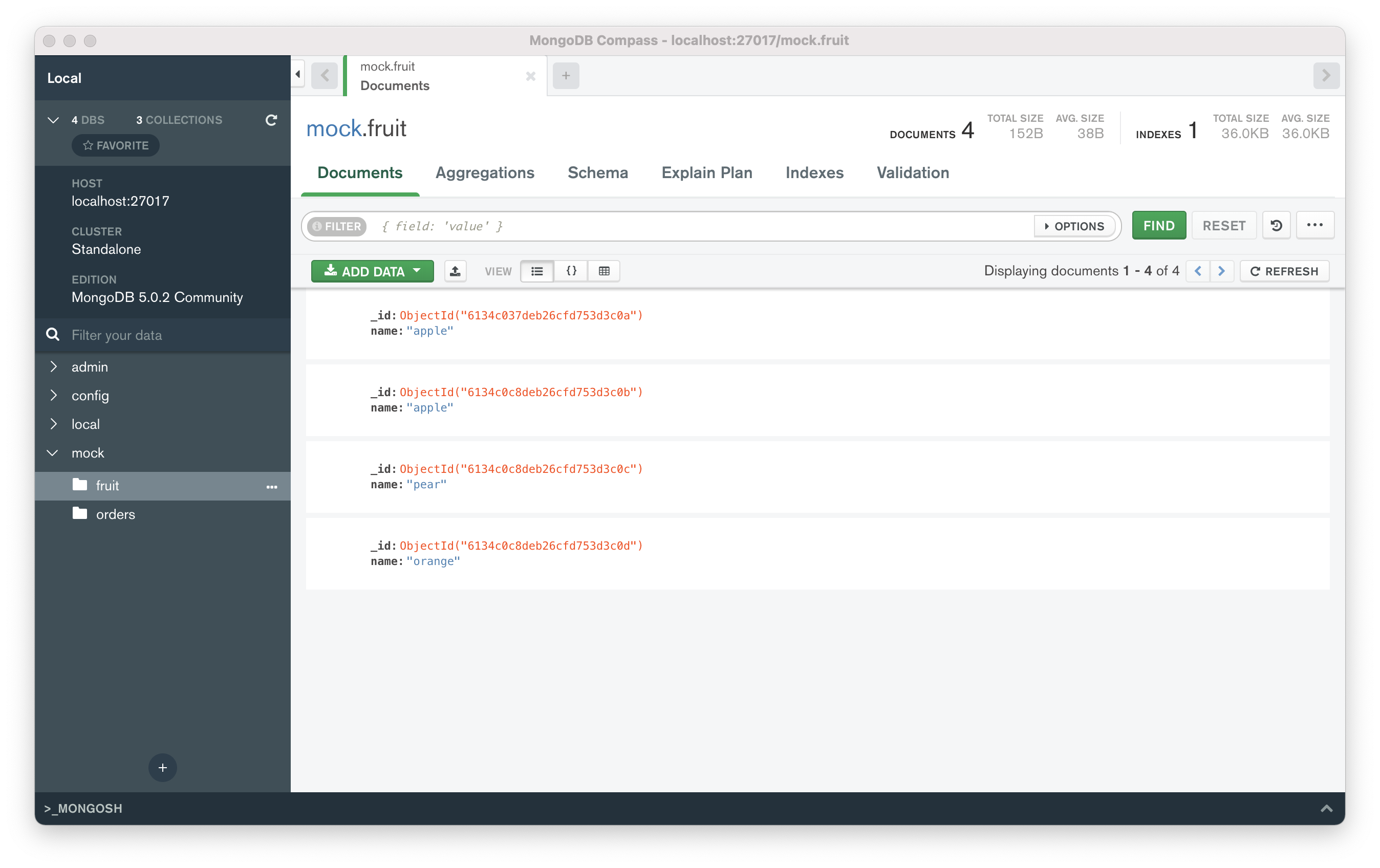
デフォルトのDBは3つある。
admin
config
local
※ 上図にあるmock DBは自分がdumpしたもの。
MongoDB 構造
- DB
 - Collection
  - Document_1
  - Document_2
  - ...
  - Document_n
1. DB について
db 一覧
show dbsdb 削除
db.dropDatabase();2. Collection について
collection 一覧
show collectionscollection 作成
db.createCollection('コレクション名');collection 削除(回復できない!!)
db.fruit.drop();3. Document について
insert フォーマット
db.{collection}.insertOne({JSON対象})
db.{collection}.insertMany([{JSON 1}, {JSON 2}, ...{JSON n}])
例
db.fruit.insertOne({name: "apple"})
db.fruit.insertMany([
  {name: "apple"},
  {name: "pear"},
  {name: "orange"}
])
find 検索
db.{collection_name}.find({検索条件})例
db.{collection_name}.find({"year":2021})
db.{collection_name}.find({$and/or: [{"year":2021}, {"name":namae}]}) 複数条件 and または or
db.{collection_name}.find({"title": /^B/} ) ※正規表現も検索できるMQLとSQLにおける条件指定の表現対照
| SQL | MQL |
|---|---|
| a = 1 | {a: 1} |
| a <> 1 | {a: {$ne: 1}} |
| a > 1 | {a: {$gt: 1}} |
| a >= 1 | {a: {$gte: 1}} |
| a < 1 | {a: {$lt: 1}} |
| a <= 1 | {a: {$lte: 1}} |
| a = 1 AND b =1 | {a: 1, b: 1} or {$and: [{a: 1}, {b: 1}]} |
| a = 1 OR b = 1 | {$or: [{a: 1}, {b: 1}]} |
| a IS NULL | {a: {$exists: false}} |
| a IN (1, 2, 3) | {a: {$in: [1, 2, 3]}} |
find()で"feild.sub_field"を検索するとき、必ず、sub_fieldまで書くこと。feildのみでの検索は何も返されない
db.fruit.insertOne(
  name: "apple",
  from: {
      country: "Japan",
      province: "Tokyo"
  }
)
上記のデータを作成し、下の例で検索してみればわかる。
db.fruit.find({"from.country": "Japan"})
db.fruit.find({"from": {country: "Japan"}}) ← 何も返されない。find()で配列も検索できる
db.fruit.insert([
  {"name": "Apple", color: ["red", "green"]},
  {"name": "Mango, color:["yellow", "green"]}
])
上記のデータを作成し、下の例で検索してみる。
db.fruit.find({color: "red"})` 1つの結果が返される
db.fruit.find({$or: [{color: "red"}, {color: "yellow"}]}) 2つの結果が返される 複数の条件で検索するとき、$elemMatchでの例
db.getCollection('movies').find({
  "filming_locations": {
      $elemMatch: {"city": "Rome", "country": "USA"}
  }
})
※下記のように検索してみて上記との結果について考えてみる。
db.getCollection('movies').find({
  "filming_location.city": "Rome",
  "filming_location.country": "USA"
})検索結果をフォーマットして検索する方法
db.movies.find({"category": "action"}, {"_id":0, title:1}) ←idを返さず、タイトルのみ返す指定remove 削除
db.fruit.remove({<条件を指定する>})
db.fruit.remove({}) fruitコレクションの全てを削除する。
db.fruit.remove() ※削除できない!!エラーが返される。
update 更新
db.fruit.update({検索条件}, {$set: 更新内容}) 例
このデータを挿入する。
db.fruit.insertMany([
  {name: "apple"},
  {name: "pear"},
  {name: "orange"}
])
この文で更新してみる。
db.fruit.updateOne({"name": "apple"}, {$set: {from: "Japan"}})注意事項:
updateOne複数文での更新はすべてはできない、一行目の文での更新しかできない。updateMany複数文でも更新できる更新内容部分の指定は以下に必ず書くこと。$set/$unset
$push/$pushAll/ $pop
$pull/ $pullAll
$addToSet
次回のメモは、簡単なサンプル(Python + MongoDB)を作成して、Mongo DBを理解する。